Orbixy
Trail Stage
Trail Stage
1. Problem Statement
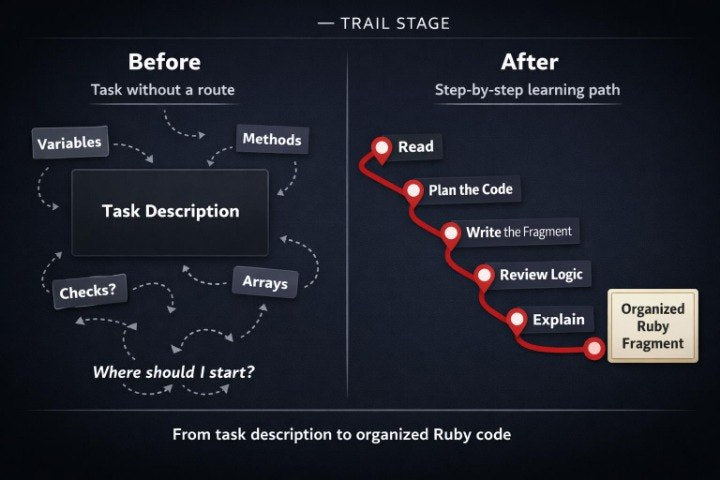
When learners have already worked with methods, conditions, arrays, data changes, and different examples, they often need longer learning routes. Separate exercises may be understandable, but a larger task with several stages can bring a new challenge: how to divide the task into steps. A learner may understand Ruby syntax, but may not always see where to begin, which data to prepare, where to place a check, and how to form the result. Without an ordered route, it is possible to skip an important stage and end up with code that is hard to explain. Trail Stage is created to help learners move through Ruby tasks step by step, with attention to logic, structure, and practical thinking.
2. Solution
Trail Stage offers a learning-route format where each Ruby task is viewed as a sequence of clear steps. The materials show how to read a task description, identify input data, define needed actions, choose a code structure, and review the result. Learners work with examples where one topic gradually expands through methods, conditions, arrays, and logic explanation. The plan includes exercises for planning before writing code, as well as tasks for analyzing existing fragments. This approach helps learners see the path from a learning idea to an organized Ruby solution more clearly.
3. What’s Inside
Trail Stage includes a set of learning routes built around Ruby programming and practical tasks with several stages. The first module focuses on reading a task before writing code. Learners study how to identify key parts of a description: which data exists at the start, what should appear at the end, which conditions affect the result, and which actions may be needed inside the solution.
The second block focuses on planning a Ruby fragment. The materials show how to create a short plan before writing code: which variables are needed, whether a method is needed, whether there will be a list of values, where a condition may appear, and which parts should be separated. Learners see that planning does not need to be complicated — a short scheme is enough to help keep the logic in place while working.
A separate module focuses on routes with methods. Here, learners review tasks where one method prepares data, another performs a check, and a third forms final text or a value. The materials explain how not to mix several different actions in one method, how to pass data between code parts, and how to track what each block returns. In exercises, learners create a method scheme, describe each role, and only then move to Ruby code.
The next section explores routes with conditions. Learners work with tasks where the result depends on several checks. The materials show how to read a condition not as an isolated part, but as part of a full execution scenario. Examples include checking numbers, text values, item presence in an array, and list length. Tasks ask learners to define which behavior variants the code has and explain why each variant leads to a different result.
Trail Stage also includes a block about arrays in longer tasks. Learners review how to prepare a list, go through values, select needed items, count a result, or form a new array. The main focus is on keeping the order of actions: first understand the data, then define the check, then process it, and only after that form the result. This structure helps learners work with arrays more carefully.
The practical part of the plan consists of several learning routes. Each route has a short task description, an analysis block, structure prompts, a place for planning, a Ruby fragment, and self-check questions. Learners do not only write code; they move through the full path: read the task, divide it into parts, choose structures, write the fragment, review the logic, and explain the solution in words.
The plan also includes “Trail Notes.” These are short notes for working through longer Ruby tasks: how to begin analysis, how to stay oriented in conditions, how to divide methods, how to track values, how to work with arrays, and how to check whether the code matches the starting description. The notes can be used as a learning map while completing exercises.
An additional block contains route-editing exercises. Learners receive a Ruby solution where stages are mixed or placed in a less helpful order. The task is to analyze the fragment, find where data preparation begins, where checking happens, where a list is processed, and where the result is formed. After that, learners rewrite the fragment in a more ordered form.
The final part of the plan includes a summary learning route. It connects several topics: variables, methods, conditions, arrays, returned values, and logic explanation. Learners work with a task where they need not only to write Ruby code, but also show the thinking path: which data was used, which checks were performed, which values changed, and how the final result was formed. This helps learners experience Ruby programming as ordered work with an idea, not as a set of random lines.
4. Who is this for?
Trail Stage is for learners who already have a basic understanding of Ruby programming and want to work with longer learning tasks. It is a good choice for learners who have completed separate exercises but want to move through a full path from task description to finished Ruby fragment. The plan may be useful for those who want more practice with planning, analysis, and code explanation.
This plan also suits learners who want to see the connection between topics more clearly. It continues Drift Collection well because, after a set of different exercises, it adds more ordered routes. Trail Stage is intended for learners who want to work with Ruby code carefully, understand each stage of a solution, and explain the logic in their own words.
5. What You’ll Learn
- How to read a Ruby task description before writing code.
- How to identify input data, actions, checks, and expected result.
- How to create a short plan for a Ruby fragment.
- How to divide a larger task into smaller stages.
- How to use methods inside a learning route.
- How to pass data between code parts.
- How to work with conditions inside a full scenario.
- How to use arrays in tasks with several steps.
- How to check whether code matches the starting description.
- How to edit a fragment where stages are mixed together.
- How to explain solution logic in words.
- How to move through a Ruby task from idea to ordered fragment.
6. Refund Terms
Trail Stage includes 30-day refund terms according to the Orbixy store policy. A learner may submit a request within 30 days after placing the order if the materials do not match expectations regarding format or content. Requests are reviewed according to the store policy and the plan description on the order page.
Couldn't load pickup availability
- 📄 Digital file available after purchase
- 📚 Long-term availability
- 🛡️ Secure checkout
- ✏️ Content updated in 2026
Self-paced learning overview
1. Are Orbixy courses suitable for learners who are new to Ruby programming?
1. Are Orbixy courses suitable for learners who are new to Ruby programming?
Yes, the materials are created so learners can gradually enter Ruby programming without overload. The lessons are built around clear explanations, code examples, and small practical tasks. Each plan has its own amount of materials, so learners can choose a format that matches their current pace.
2. How are the plans different from each other?
2. How are the plans different from each other?
The plans grow in order by the amount of materials, topic depth, and number of practical tasks. Starter plans introduce basic concepts, while higher plans add more structure, examples, modules, and practice. This helps learners choose a format that fits their current stage and learning goals.
3. What is included in the learning materials?
3. What is included in the learning materials?
Depending on the plan, learners receive lessons, modules, code examples, short explanations, practical exercises, topic-based selections, and additional resources. The materials focus on Ruby programming: syntax, logic, code structure, working with data, and building small programming solutions. All sections are arranged step by step so the learning path has a clear order.
4. Are there refund terms?
4. Are there refund terms?
Yes, paid plans may include a 30-day refund period according to the store terms. The Free Kit plan does not require payment, so refunds do not apply to it. Before choosing a plan, learners can review the description, included materials, and learning topics.
Share